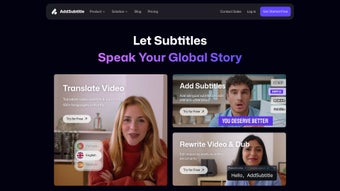

Download AddSubtitle – AI Video Subtitling, Translation & Dubbing Tool
Overview
AddSubtitle is a cloud‑based AI powerhouse designed specifically for creators, marketers, and businesses that need to reach a global audience quickly and affordably. Built on the latest neural‑network translation models, the platform can translate, subtitle, and dub video content in more than 100 languages, all from a single intuitive web interface. Whether you are a YouTuber looking to expand your subscriber base, an e‑learning provider seeking multilingual courses, or a corporate trainer needing localized training videos, AddSubtitle streamlines the entire workflow: upload your video, select the target language, and let the AI generate synchronized subtitles or a fully dubbed track in seconds.
The service also includes a robust video rewrite engine that lets you edit the script, automatically adjust lip‑sync, and preserve natural speech cadence—features that previously required expensive post‑production studios. With custom styling options, you can match subtitle fonts, colors, and placement to your brand guidelines, making each version feel native rather than a translation afterthought. The platform’s security protocols meet industry‑standard encryption, ensuring that your media assets stay private throughout processing.
In short, AddSubtitle eliminates the bottlenecks of manual subtitling and dubbing, turning a multi‑hour, multi‑language project into a few clicks, while maintaining high translation accuracy and natural‑sounding voice‑overs.
Key Features that Set AddSubtitle Apart
- Instant Multilingual Subtitling: Generate subtitles in over 100 languages with AI‑driven timing that aligns perfectly with on‑screen speech.
- AI‑Powered Dubbing: Convert text scripts into natural‑sounding voice‑overs using a library of native‑like synthetic voices.
- Video Rewrite & Lip‑Sync: Edit the original script, and the engine automatically adjusts the voice track and lip movements for a seamless experience.
- Custom Styling Options: Choose from a palette of fonts, colors, background opacity, and positioning presets to match your brand identity.
- Bulk Upload & Batch Processing: Upload multiple videos at once and apply the same language settings, saving hours on large projects.
- Secure Cloud Processing: End‑to‑end encryption protects your source files, and all processed media is stored on GDPR‑compliant servers.
- Collaborative Editing: Invite team members to review, suggest edits, or approve subtitles before final export.
- Export Flexibility: Download subtitles in SRT, VTT, or embedded MP4 formats, and export dubbed videos in MP4, MOV, or WebM.
- API Access: Integrate AddSubtitle’s capabilities into your own workflow or CMS with a well‑documented REST API.
- Continuous Learning Model: The AI improves over time, learning from user corrections to boost translation accuracy for niche terminology.
Installation, Usage & Compatibility
Because AddSubtitle is a web‑based solution, there is no traditional installation required. All you need is a modern browser (Chrome, Edge, Firefox, or Safari) and an internet connection. Follow these simple steps to start subtitling and dubbing your videos:
- Create an Account: Visit addsubtitle.com and sign up using an email address or single‑sign‑on (Google, Microsoft, or Apple ID). A free trial provides 30 minutes of processing time.
- Upload Your Video: Click the “Upload” button, drag‑and‑drop your MP4, MOV, or AVI file, or paste a YouTube/Vimeo URL. The platform automatically extracts audio for analysis.
- Select Language & Mode: Choose “Subtitle” or “Dubbing,” then pick the target language from the dropdown list. For dubbing, you can also select a preferred voice style (male, female, formal, casual).
- Review & Edit: Once the AI finishes, a preview window shows the generated subtitles or dubbed track. Use the built‑in editor to adjust timing, correct translations, or rewrite sections of the script.
- Style & Export: Apply custom subtitle styling, then click “Export.” Choose the desired file format (SRT, VTT, embedded video) and download the result to your device.
Operating System Support (itemprop="operatingSystem"):
- Windows 10 and later – full browser compatibility.
- macOS 11 (Big Sur) and later – works seamlessly in Safari, Chrome, or Firefox.
- Linux distributions – supported via Chrome or Firefox.
- iOS 13+ and Android 9+ – mobile browsers can access the web app, though editing is best on a desktop.
While the service runs entirely in the cloud, you can also download the optional desktop companion (available for Windows and macOS) that acts as a local uploader, letting you drag files into a dedicated folder which automatically syncs with your AddSubtitle account. This is handy for teams with strict firewall rules or for offline batch preparation before a single bulk upload.
Pros, Cons, Frequently Asked Questions & Final Thoughts
Pros
- Fast, AI‑driven translation eliminates manual subtitle creation.
- Over 100 language options cover most global markets.
- Video rewrite with automatic lip‑sync creates professional‑grade dubbing.
- No software installation—access from any device with a browser.
- Secure cloud processing meets GDPR and industry security standards.
- Custom styling keeps brand consistency across all language versions.
- Bulk processing and API integration streamline large‑scale projects.
Cons
- High‑quality synthetic voices may require a premium subscription for some languages.
- Internet bandwidth can affect upload and processing speed for large video files.
- While AI accuracy is strong, niche industry jargon sometimes needs manual correction.
- Limited offline functionality—full features rely on an internet connection.
Frequently Asked Questions
Can I use AddSubtitle for commercial projects?
Yes. AddSubtitle offers commercial licenses that include bulk‑processing discounts, priority support, and extended usage rights for all generated subtitles and voice‑overs.
How accurate are the translations?
The AI model is trained on millions of sentence pairs and continuously learns from user feedback. For most common languages, accuracy exceeds 95%, but we recommend a quick human review for technical or specialized content.
What file formats are supported for import and export?
Import: MP4, MOV, AVI, WMV, WebM, and direct URLs from YouTube/Vimeo. Export: Subtitles in SRT, VTT, and embedded MP4; dubbed videos in MP4, MOV, and WebM.
Is there a free version or trial?
AddSubtitle offers a 30‑minute free trial for new users, allowing you to test subtitle generation and dubbing before committing to a paid plan.
How does the video rewrite feature handle lip‑sync?
When you edit the script, the AI re‑generates the audio track and runs a facial‑animation algorithm that adjusts mouth shapes frame‑by‑frame, delivering a natural lip‑sync that matches the new dialogue.
Conclusion & Call to Action
AddSubtitle delivers a compelling blend of speed, accuracy, and creative flexibility that makes multilingual video production accessible to creators of any size. By handling subtitling, dubbing, and script rewriting in a single cloud platform, it removes the traditional barriers of time‑consuming manual work and costly studio sessions. Whether you’re aiming to grow an international YouTube channel, launch multilingual corporate training, or simply make your content more inclusive, AddSubtitle provides the tools you need to do it securely and efficiently. Ready to expand your audience without the usual hassle? Sign up for a free trial today and experience the future of AI‑driven video localization.



.png)



